|
|
|||||||
The Mandelbrot set
real min:
real max:
img. min:
img. max:
iterations:
|
|
| Julia examples |
|
A so-called complex number is a number that is composed of two parts:
|
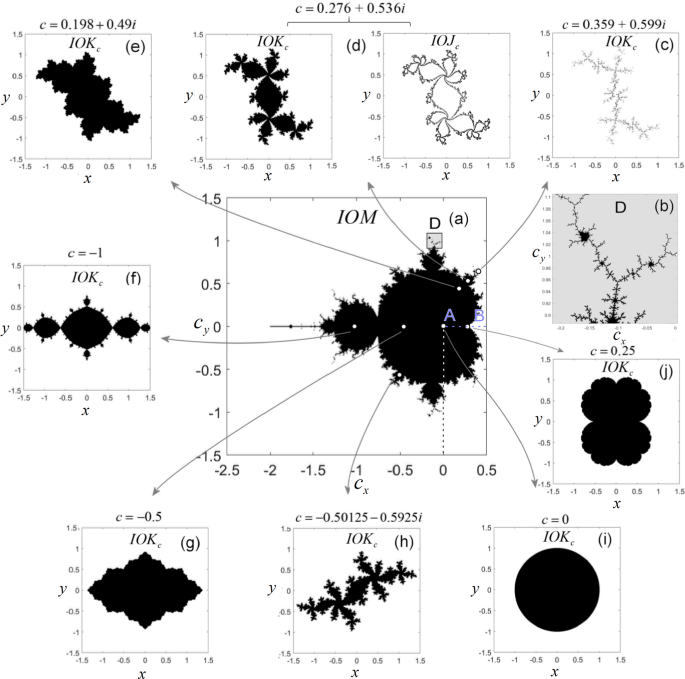
Depending on your hardware and your browser, this may take more or less time. We have noticed, for instance (end of 2025), that on the Firefox browser, the computations are quite a bit faster than on the Chrome browser. Riding the Mandelbus(credit: the term and idea of the 'Mandelbus' came from a 1989 paper by A.K. Dewdney) To follow the trajectory of a point (complex number) through its steps, first click the Mandelbus button, then select a point (complex number) by clicking a location on the surface (step 0). The browser will compute the result for step 1 and draw a (red) line from the result of step 0 to the result of step 1. Another click computes step 2 and connects the result of step 1 with that of step 2, another one does step 3, etc. Thus, continued clicking displays the trajectory of the complex number you selected as you subject it to ever more steps. As long as the 'Mandelbus' remains in the area, you can continue to take steps. But once the bus escapes the neighborhood on its way to infinity, no more steps will be taken. At any time you can select the Reset button to reset the screen. If you try several points: some inside the Mandelbrot set, some outside the set (please Reset between trying points), you will notice that if you pick a point within the Mandelbrot set, the 'Mandelbus' remains in the area. Whereas if you pick a point outside the set (a point in the black space), the bus quickly escapes to infinity. You will also notice that as you pick points closer to the 'edge' of the Mandelbrot set, it takes more steps to decide if the bus remains in the neighborhood or will escape to infinity. This brings up an important question: Where exactly is the border of the Mandelbrot set?Does the Mandelbrot set have a border?Perhaps the most intriquing question associated with the Mandelbrot set is whether it has a border.We just saw that as we ride the Mandelbus with points close the set's border, ever more steps are required to decide if the point remains in the area or escapes to infinity. By default the maximum number of steps (iterations) is set to 100. Please play with this number; e.g., try 100 and 500 and study the differences in results (note: be patient; setting iterations to 500 significantly increases the number of computations needed to compute the set). What do we see? Well, the set seems to get a little larger when the max iterations is set to 100, and smaller when the max iterations is set to 500. There are also far larger grey areas in the 100-iterations set than in the 500-iterations set. Clearly then, it seems that if we increase the maximum number of steps (iterations), the border becomes less fuzzy; more precise. We can explore this further by zooming in on the set's border; i.e., we take a small area near the set's border and 'blow it up' to look at the details inside. To do this, first Reset the page. Then, with your mouse, click and drag a small rectangle area somewhere that includes a section of the set's border; then select Plot. You may also want to combine this with larger numbers of iterations. We will observe a few things: Beauty bonus: Julia setsThe trip into beautiful complexity of numbers does not stop here. The Mandelbrot set is tightly connected with another type of set: the so-called Julia set named after the French mathematician Gaston Julia. Wheras there is only a single Mandelbrot set, each complex number has its own Julia set. Julia sets are computed using the same steps as the ones used in the Mandelbrot set, but instead of checking all the numbers on the surface for escape from the surface, we now check all the numbers on the surface for escape from a specific point on the surface. Hence, each point (complex number) on the surface having its own Julia set. To generate Julia sets, first Reset the page; then select the Julia button; then click on a point on the Mandelbrot image surface. The Julia set associated with the point you selected will appear in a separate browser tab. Note that depending on how you pick the point for your Julia set, a Julia set can be fantastically complex and beautiful, or rather simple. Take a look at Julia examples to gain some idea of where interesting Julia sets can be found. Also, note that once you have a Julia set displayed, it is worth playing with the 'iterations number. Lowering or increasing the number of iterations used for computing a Julia set can dramatically increase the complexity and visual appeal of the set.
| |